

Prepare the document.
Start with your saved customer and items, or add a one-off customer as you go.
Create professional invoices, see what is due and keep your next step clear. Built for UK sole traders and small businesses.
10 invoices a month on Free. No card required.
See what’s included in each plan.

For UK sole traders and small businesses, from a job on site to a regular client. Keep the paperwork together when the work is done.
Start with your saved customer and items, or add a one-off customer as you go.
Review quantities, prices, discounts and VAT together before you save.
Download a PDF on Free. Use Pro to email it directly from YourInvoices.
See outstanding invoices and recorded payments. Add optional reminders on Pro.
From agreeing the work to keeping a record of payment. A clear place for the paperwork that goes with running your business.
Explore the featuresAdd your logo, customer and line items. Set VAT where it applies, review the totals and download or print a PDF. Invoices and estimates are included on Free.
Invoices, estimates & PDFs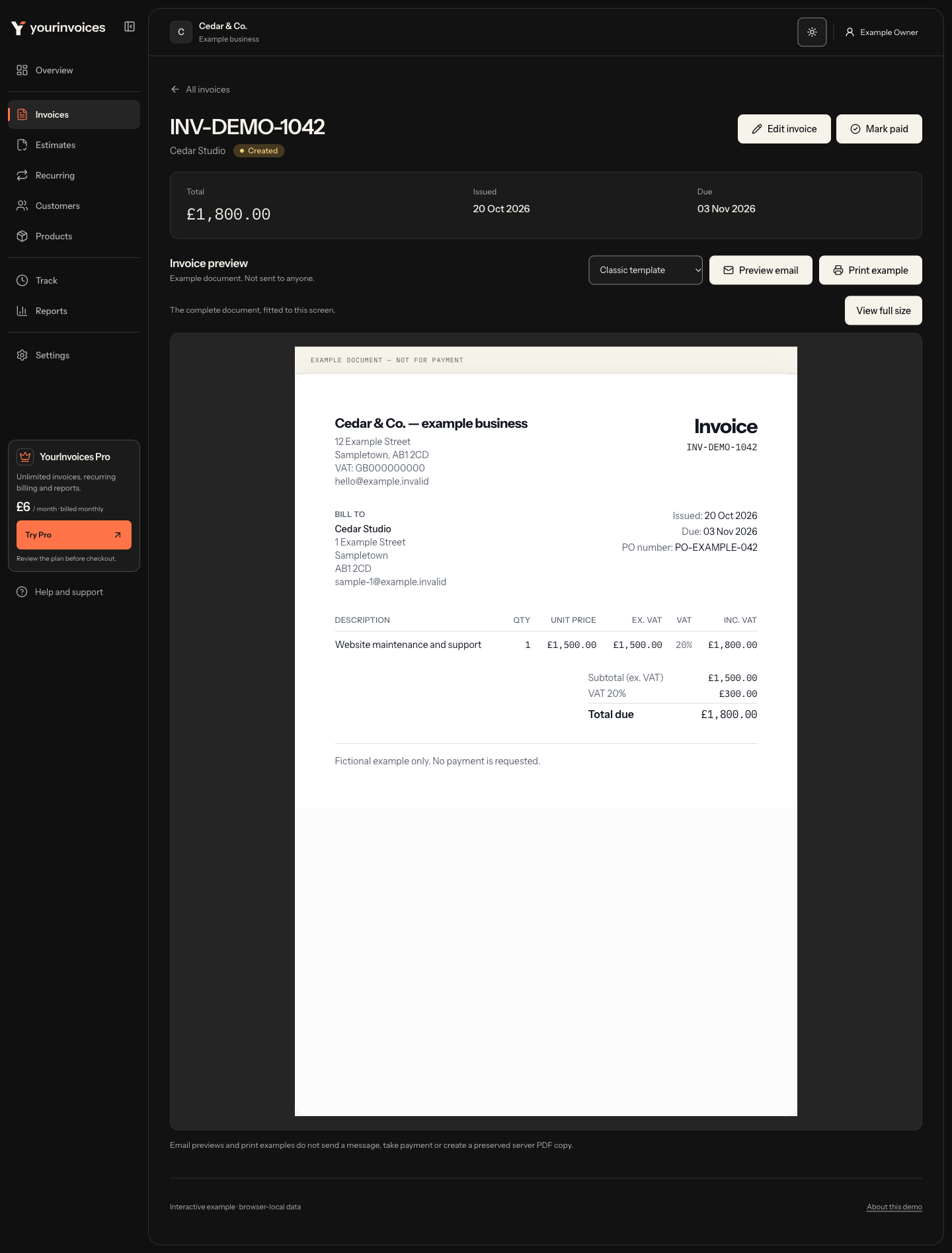
Keep your invoices together and filter what needs attention. Mark an invoice as paid once you’ve confirmed payment.
Take a look inside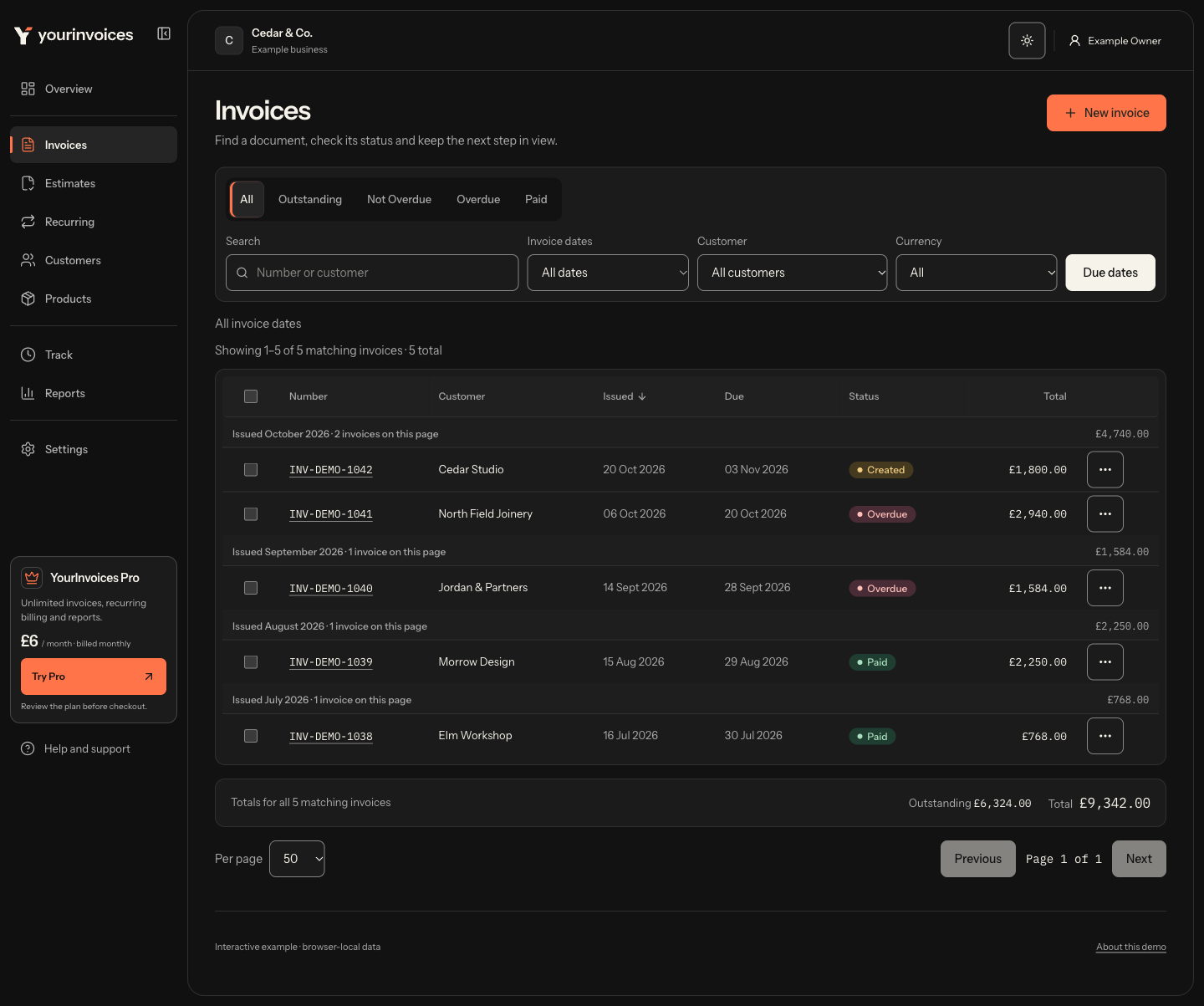
The redesigned app will keep original and revised PDF copies together. This planned feature is shown with fictional test records. In the current live app, keep the PDF files you send for your own records.
Preview the planned PDF copies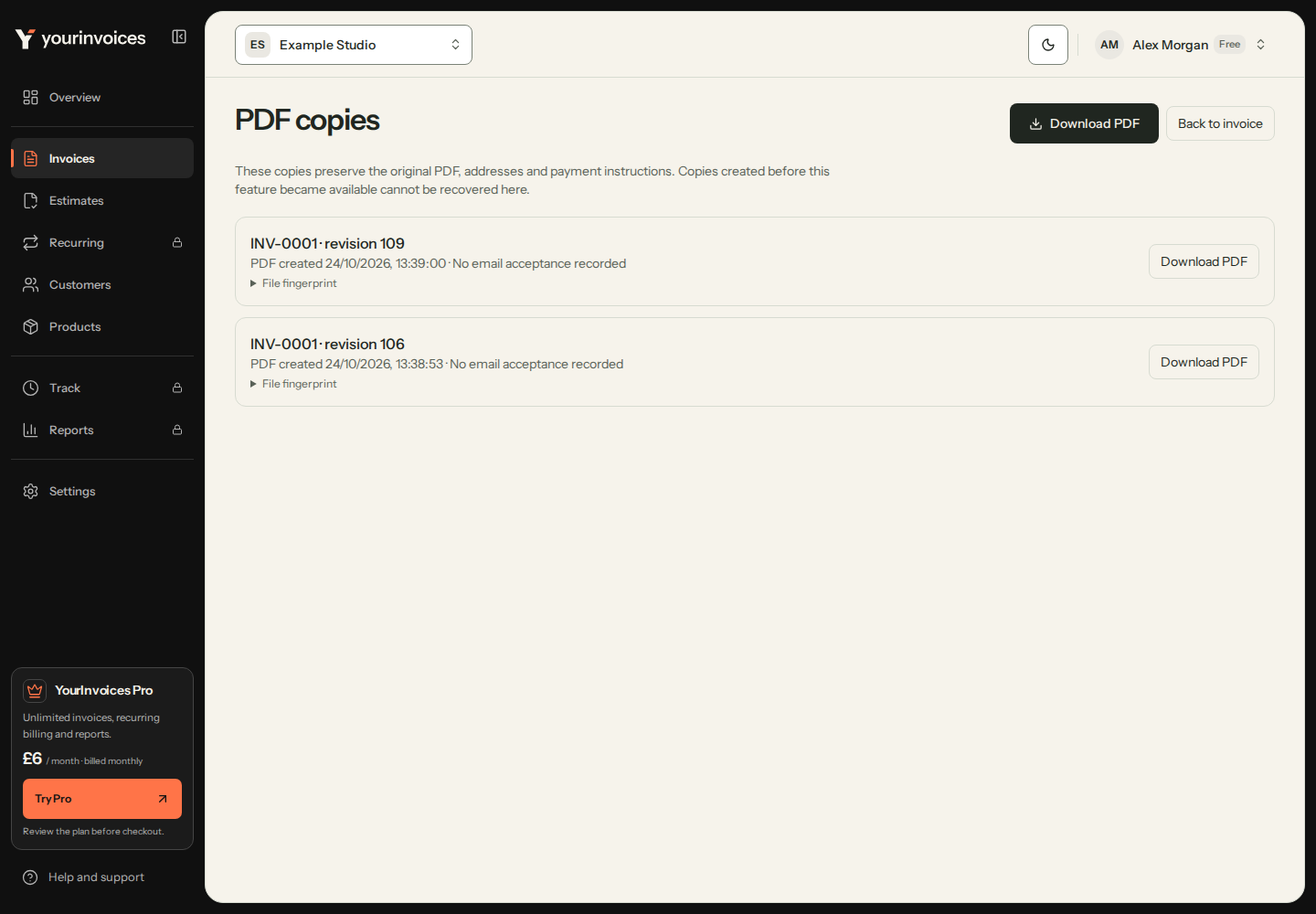
Scroll through the work, or choose a chapter above.
Pro adds recurring GBP invoices, optional payment reminders and direct emailing. Review your setup and choose what runs for your business.
Prepare the quote, keep the details ready and review the invoices that follow. Start with Free. Add Pro for regular billing, recorded work and reporting.
PDFs on Free and Pro · direct emailing on Pro
Add your customer, quantities and prices. Review per-line VAT and the total, then download or print a PDF with your business and payment details.
Explore invoicingFree and Pro · direct emailing on Pro
Set out the scope, price and valid-until date. Record an accepted or declined estimate, and turn an accepted quote into an invoice.
Explore estimatesPro
Schedule GBP invoices weekly, monthly, quarterly or yearly. Pause a schedule when plans change and review each generated invoice before sending.
Explore recurring invoicesPro
Record expenses by date, vendor and category. Mark billable costs for the relevant customer and review what you have recorded.
Explore expensesPro
Record time against a customer and rate. Track mileage and expenses alongside it, then transfer compatible billable entries to an invoice.
Explore time trackingPro
Review invoice totals, recorded paid status, outstanding amounts and aging. Choose report sections to export. Paid totals are grouped by invoice date.
Explore reportsThe customer, the items, the right business. A useful starting point for the next invoice.
Free and Pro
Save customer contact details and a catalogue of products or services. Reuse descriptions, prices and VAT rates when you prepare the next document.
Free and Pro
Choose 20%, 5% or zero VAT per line, or turn VAT off for a business that is not registered. Review your own tax details before sending.
GBP on Free · all three on Pro
Create GBP invoices on Free. Pro adds EUR and USD for invoices, with each document showing its own currency and total.
Pro
Work with up to 25 people per business, including the owner and unexpired pending invitations. Choose each teammate’s role and review existing access.
Pro · one business on Free
Switch between businesses with their own customers, invoices and supplier details. Check the active business before preparing a document.
Customer import and backup on both plans
Import customers from CSV. Download invoices, customers and settings as a JSON backup. Pro also includes CSV exports from Reports.
The quote, the customer details, the work and the follow-up. See what is included before you choose a plan.
Pro team capacity includes the owner and unexpired pending invitations. Compare Free and Pro in full.
Choose Professional, Classic, Modern or Minimal. Each uses your business details, line items and totals. Change the template in Settings.
Logo header, detailed table, three-column footer.
Fictional example: Northgate Garage Ltd to Acme Motors Ltd. Net £210.00, VAT £42.00, total £252.00. Choose full size to read the document, then scroll inside it.
Traditional and familiar.
Fictional example: Northgate Garage Ltd to Acme Motors Ltd. Net £210.00, VAT £42.00, total £252.00. Choose full size to read the document, then scroll inside it.
Accent header, bold total.
Fictional example: Northgate Garage Ltd to Acme Motors Ltd. Net £210.00, VAT £42.00, total £252.00. Choose full size to read the document, then scroll inside it.
Understated, lots of space.
Fictional example: Northgate Garage Ltd to Acme Motors Ltd. Net £210.00, VAT £42.00, total £252.00. Choose full size to read the document, then scroll inside it.
Choose a template above to view the example.
PDFs are included on Free and Pro. Review your own business details, tax information and totals before sending.
Try the free invoice generatorCreate up to 10 invoices a month on Free. Choose Pro for more invoices and business tools.
Create PDFs and send them yourself.
£0
free forever · no card required
Email invoices and manage regular work.
£6/month
billed monthly · cancel anytime
Your account starts on Free. Choose Pro inside the app.
Pro capacity includes the owner and unexpired pending invitations. You can export your records on either plan. Pro can be cancelled from your account.
At the Free monthly limit, upgrade to create more invoices. Existing invoices remain available to view and download. Deleting an invoice does not reset the monthly allowance.
Compare every feature in Free and ProOpen each screen at full size, then scroll inside it. All data is fictional.
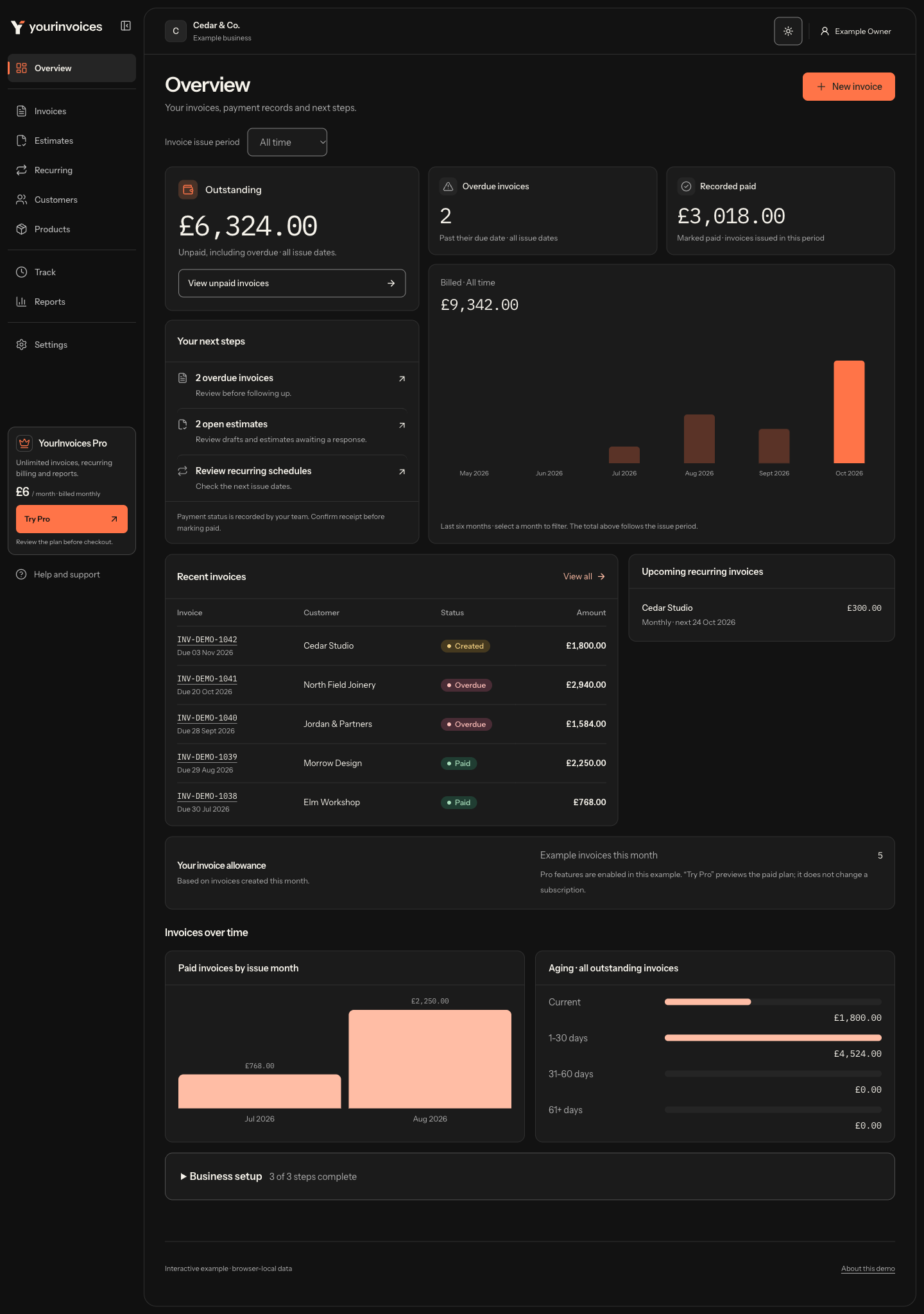
Outstanding invoices, recorded payments and next steps together in one workspace.
Shown to fit your screen. Choose full size to read the details, then scroll inside the image.
Screenshot of the forthcoming web app. Fictional example data; this image is not an interactive account.
A closer look at the invoice list, including customer, date and payment-status filters.
Shown to fit your screen. Choose full size to read the details, then scroll inside the image.
Screenshot of the forthcoming web app. Fictional example data; this image is not an interactive account.
Review the invoice details, recorded payment status and document template before the next step.
Shown to fit your screen. Choose full size to read the details, then scroll inside the image.
Screenshot of the forthcoming web app. Fictional example data; this image is not an interactive account.
Scroll through the mobile web editor to see customer details, line items, VAT and the total.
Scroll inside the screen to reach every field.
Screenshot of the forthcoming web app. Fictional example data; this image is not an interactive account.
Choose a screen above to look around the workspace.
A free account includes 10 invoices a month, one business and one user. No card required.
Create your first invoiceEnter the supplier details, logo and payment instructions you want on the document. Set VAT for your business.
Invoice setup guideChoose a customer and add the work, quantities, prices and payment date. Review the customer details, VAT and final total before saving.
Invoice featuresUse the PDF download or print options and keep a copy of what you send. Share the file yourself, or use Pro to email directly from YourInvoices.
Compare Free and ProCreate and download 10 invoices per month free, with estimates, one business and one user. Direct emailing from YourInvoices requires Pro. No card required.
You can start by entering your business details, choosing a customer and adding the work to an invoice. The app calculates the line totals and VAT you select. Check your own tax position and the finished document before sending.
Follow the first invoice guideFree includes 10 invoices per month. Your dashboard shows the allowance used. You can upgrade to Pro to create more, while existing invoices remain available to view and download. Deleting an invoice does not restore the monthly allowance.
See the plan limitsYes. Import customers from a CSV in Settings → Tools, review the preview and check the result. You can also save a customer as you go or enter a one-off customer while preparing a document.
Read the customer import guideChoose per-line VAT rates of 20%, 5% or zero, or turn VAT off if your business is not registered. Enter your own business and tax details and check the invoice for your circumstances.
Choose Download PDF to open your browser’s print dialog, then save a PDF or print the invoice. Keep the files you send for your own records.
On Pro you can invoice in GBP, EUR or USD, and apply percentage or fixed discounts per invoice. Amounts and VAT are calculated automatically.
Add your own bank or payment details to the invoice so your customer knows how to pay you. Mark the invoice Paid after you confirm the payment. YourInvoices does not provide customer card-payment links or automatically collect payment.
Read the invoicing guideOn Pro, a weekly, monthly, quarterly or yearly schedule creates invoices from your saved template. Review each generated invoice before sending it. Creating the invoice does not automatically email it or collect payment. Recurring schedules use GBP.
Read the recurring invoice guidePro is £6/month, and includes: unlimited invoices, customers and businesses, recurring invoices, payment reminders, expenses, time and mileage, reports, multi-currency, a team and priority support. Cancel any time.
Compare Free and ProYes. Paid plans are billed monthly. Cancel from billing settings to stop the next renewal. You keep Pro until the end of the period you have paid for, then your account continues on Free. Cancelling does not delete your data.
Your account requires sign-in, and database access rules separate each business’s records. The security policy explains how we build the service and how to report a concern.
Read the security policyYour business details. Your customer. The work you’ve done. Start with one invoice and take it from there.